AI Copilot Overview

AI Copilot is your assistant for working with V2 Logic and Segments.
It helps you turn real advertising questions into working Segment Logic, without having to memorize all of the syntax.

You can access Copilot:

  • From inside a Segment using the AI Copilot button, or
  • By visiting merchjar.com/copilot, which opens the same assistant.

What Copilot Is Designed To Do

At its core, Copilot makes it much easier to:

  • Create new Segments from plain language.
    Describe what you want to see (“find keywords that used to convert but went quiet recently”), and Copilot will propose V2 Logic that matches that intent.
  • Refine and evolve existing logic.
    Paste your current Segment Logic and ask it to tighten thresholds, create custom properties, add filters, change time windows, or simplify the expression.
  • Explain what a Segment is doing.
    If you inherit logic from someone else (or from past you), Copilot can walk through it in simple terms, highlighting what it’s filtering on and why.
  • Work from your own data.
    You can upload screenshots, CSV exports, or other snippets of performance data. Copilot can use that context to suggest Segment ideas and automation strategies.

It adapts to your requests like any AI conversation. You’re not locked into a specific flow—ask follow-up questions, change direction, or explore multiple ideas in one thread.

How to Work With Copilot

Think of Copilot as a collaborator, not a black box:
  1. Start with a real problem.
    Examples:
    • “I want to catch keywords that are spending more than usual without extra sales.”
    • “Help me find search terms that are great candidates for exact match negatives.”
    • “Show me ideas for Segments that could keep ACOS stable during Q4.”
  2. Let it draft logic or a strategy.
    Copilot will usually:
    • Suggest V2 Logic for a Segment, and
    • Explain what that Segment is meant to do in practical terms.
  3. Iterate in conversation.
    You can nudge it with prompts like:
    • “Make this more conservative.”
    • “Add a clicks threshold so we only act with enough data.”
    • “Compare recent 7 days vs previous 30 days instead.”
    • “Use Target ACOS instead of a hard-coded ACOS.”
  4. Ask it to review or improve your own logic.
    Paste code and say things like:
    • “Check this for obvious issues.”
    • “Explain this in plain English.”
    • “Turn this into a version that’s safer for daily automation.”
  5. Use it as a strategist, not just a coder.
    With screenshots or CSVs, you can ask:
    • “What Segments would you build from this performance?”
    • “Which keywords look like they need bid cuts vs negatives?”

Syntax Validation and Safety

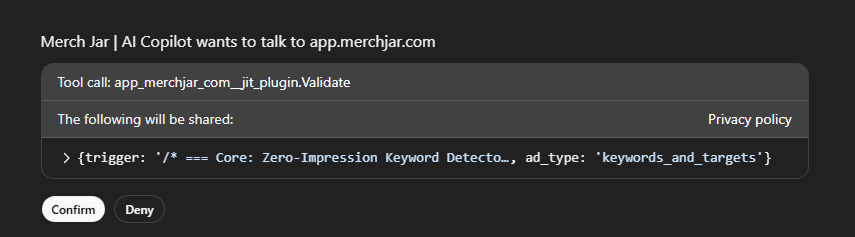
Copilot is powerful, but it’s still an AI model—it can make syntax mistakes or assume capabilities that don’t exist. To keep things safe and reliable, it’s connected to Merch Jar’s validation service.

  • Validation flow (high-level):
    • When you ask it to validate, or when it suggests a validation step, Copilot will ask for your permission to connect to Merch Jar.
    • If you click Confirm, it sends the proposed Segment Logic and dataset type to our servers for a syntax check.
    • The response tells Copilot whether the logic is valid and, if not, which syntax errors were found.
    • Copilot then uses those errors to fix the logic and can re-check if needed.
  • Why validation matters:
    • It catches small syntax issues that are easy to miss by eye.
    • It forces Copilot to align with the actual V2 Logic syntax and capabilities, reducing hallucinated functions or properties.
    • It gives you a specific, validated version of the logic to copy into your Segment.

Even with validation:

  • You should still read the logic and make sure it matches your intent.
  • It helps to have a basic understanding of V2 Logic so you can spot anything that doesn’t look right.
  • Start new automations in monitor-only mode or with gentle actions before turning them loose on aggressive bid or budget changes.

Example Ways to Use Copilot

A few ideas to seed how users think about it:

  • “Draft a Segment that finds keywords with rising ACOS but stable or growing sales, so I can reduce bids slightly without killing volume.”
  • “Review this Segment and make it safer for daily automation with minimum orders and a cooldown.”
  • “Here’s a CSV of my top search terms from last month. Suggest three Segments I could build to manage winners, losers, and testing terms.”
  • “Explain, in plain language, what this logic is doing and when it would trigger actions.”

You can keep using the same conversation to refine and extend the logic until you’re happy with it, then validate and copy it into Merch Jar.

PREVIOUS ARTICLE
NEXT ARTICLE