
How to Run Amazon Ads for KDP Books (and Count the Page Reads)
Amazon ads for KDP books run in the same Amazon Ads console as any other product, and nearly all of the work happens in Sponsored Products. You launch from the Marketing tab in KDP, pick a marketplace, then run an automatic campaign next to manual keyword and product targets. Set bids from what you earn per sale, which is the royalty. And on any title in Kindle Unlimited, the ACoS Amazon shows you leaves page reads out completely, so a book can look like it’s losing money when it’s paying for itself. The setup is quick. Most of this guide is about getting that math right.
Which Amazon ads you can run for a book
Sponsored Products is where book campaigns start. The ads show in shopping results and on product detail pages, and Amazon’s guide for authors says that covers Amazon, Kindle and Goodreads. You pay per click, and you set the bid and the budget.
Sponsored Brands puts several of your books together in one ad, and it can run as video. It has a catalog requirement. KDP’s advertising help page says you need at least one pen name with three unique titles in your Author Central account.
Past that, Amazon offers managed display services for books, which its book advertising page says typically need a minimum spend of $50,000 and go through an account executive.
A few eligibility details catch people out.
- KDP titles can be advertised in the US, Canada, Mexico, UK, Germany, Italy, Spain, France, Netherlands, India, Australia and Japan. Each marketplace bills separately.
- The book has to be available in the marketplace you’re advertising in.
- Audiobook ads are US only for now.
- Every ad goes through moderation, usually within 24 hours and up to three business days. Some topics carry advertising limits, including romance, self-help and weight loss, and covers can’t be sexually suggestive. If you publish in those genres, read Amazon’s book ad moderation guide before you write custom text.
Setting up the first campaigns
In KDP, open the Marketing tab and choose Start Advertising in the Amazon Ads section. That takes you into the Ads console, which is where the campaigns live and where you’ll manage them from then on.
A sensible start for a new title is two kinds of campaign running side by side.
The automatic campaign lets Amazon match the book to searches and pages. Amazon’s targeting guide splits automatic targeting into four groups (close match, loose match, substitutes and complements), and you can bid on each group separately. Its real value is the search term report, which shows the phrases readers actually typed before they clicked.
Manual campaigns are where you control the money. Keyword targets use broad, phrase or exact match, and for books the useful ones tend to be comparable author names, series names and the genre phrases readers search for, like “cozy mystery with cats.” Product targeting puts your ad on specific book detail pages or on whole categories, which you can narrow by things like price range and star rating. Comparable titles in your subgenre are the obvious first targets. Then it’s maintenance. Terms that keep spending without selling go in as negative keywords, books whose pages never convert go in as negative products, and the terms that sell move into exact match with their own bids. Our search term report walkthrough covers reading it before you change anything.
On bidding strategy, Amazon recommends dynamic bids up and down and suggests dynamic bids down only when you’re optimizing for return on ad spend. On a format with a thin breakeven, down only is the calmer place to start.
Your breakeven ACoS comes from your royalty
ACoS is ad spend divided by ad-attributed sales, and Amazon counts those sales at the price the reader paid. You don’t keep the price. You keep the royalty, so that’s where your breakeven comes from.
Breakeven ACoS = royalty per sale / sale price
Take a constructed example, one title in two formats. The ebook sells for $4.99 and earns a $3.40 royalty. The paperback sells for $14.99 and earns $3.10 after printing.
Ebook: $3.40 / $4.99 = 68.1% breakeven ACoS
Paperback: $3.10 / $14.99 = 20.7% breakeven ACoS
Same story, same reader, and the paperback can carry about a third of the ACoS the ebook can. One ACoS target across a catalog can’t be right for both. Set targets per format at the very least, and recheck them whenever a price changes, because the royalty moves with it.
The breakeven ACoS calculator takes a royalty and a sale price. How far under breakeven to aim is a separate decision, and our guide to a good ACoS walks through it.
Kindle Unlimited page reads aren't in your ad sales
This is the part that changes decisions. KDP’s help page says the ad sales attributed to your books don’t include Kindle Unlimited pages read. A reader who clicks your ad and borrows the book through KU earns you royalties, and ACoS never sees them.
The Ads console does report those reads, in their own columns. You’ll see KENP read (Kindle Edition Normalized Pages) attributed to the campaign, counted when the reader reads within 14 days of the click, plus an estimated royalty for those pages. Both cover ad-attributed reads only.
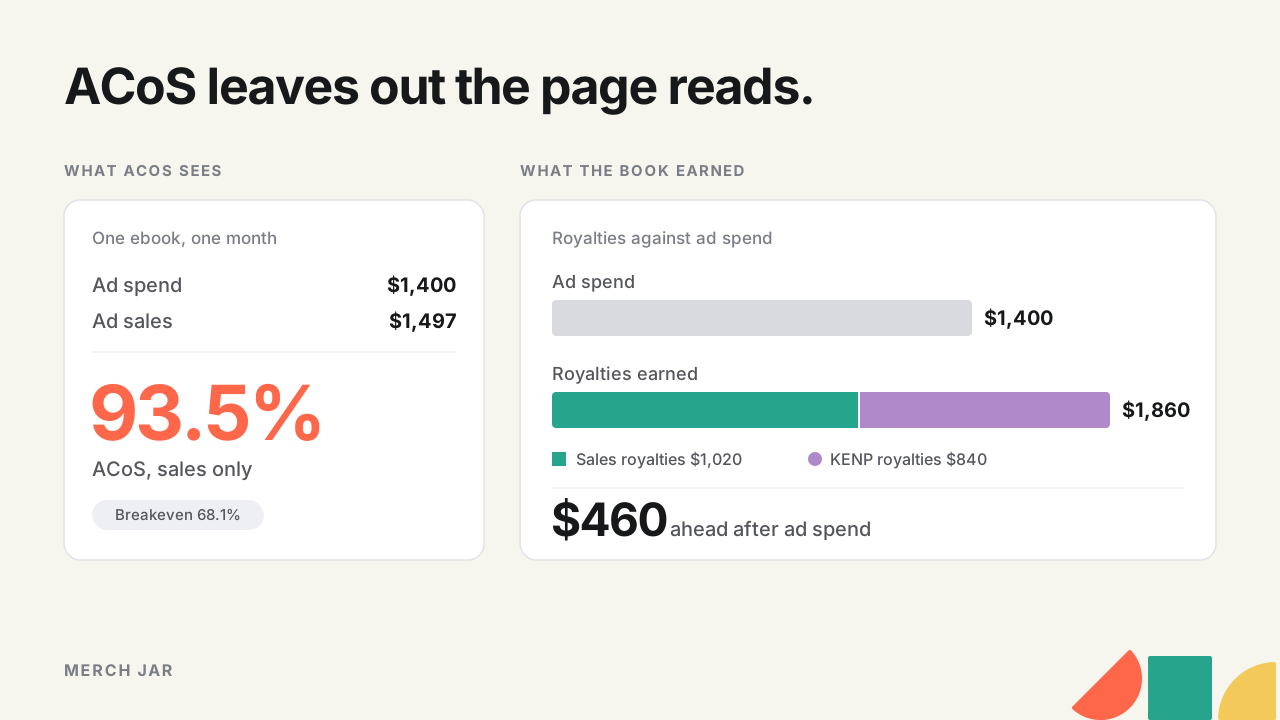
Constructed figures for one ebook over a month show how far apart the two views can land.
| Line | Amount |
|---|---|
| Ad spend | $1,400 |
| Ad-attributed orders | 300 at $4.99 |
| Ad-attributed sales | $1,497 |
| Royalties on those orders (300 × $3.40) | $1,020 |
| Estimated KENP royalties | $840 |
Sales-only ACoS is $1,400 / $1,497, about 93.5%, way past the ebook’s 68.1% breakeven. Going by that, you’d cut bids or pause the campaign.
Now count what the book earned. $1,020 in sales royalties plus $840 from page reads is $1,860, against $1,400 of spend, so the campaign is $460 ahead in the month. For a KU title that’s the test that matters, royalties earned against spend. Some reports also show ACoS including KENP royalties (spend divided by sales plus KENP royalties), which here works out to $1,400 / $2,337, or 59.9%. It’s a fuller view than sales-only ACoS, but list-price sales and royalties aren’t the same kind of money, so treat it as a comparison figure and not as profit.
KU money also arrives on its own schedule. Royalties come out of the KDP Select Global Fund, split by each author’s share of total pages read, so there’s no fixed per-page rate you can plan around. KDP pays for pages read the first time only, up to 3,000 KENP per title per customer, and says monthly KENP numbers can change until they’re finalized near the 15th of the following month (all from its Kindle Unlimited royalties page). So the royalty in your ads console is an estimate. Give KU-heavy titles a few weeks of data before you judge them.
Read-through and the rest of the series
Ad sales count books sold within 14 days of the click. A reader who finishes book one and buys book two a month later shows up in your KDP reports and nowhere in the campaign. For a long series that can be a big share of what the first click was worth, and nothing in the campaign report credits it back to the ad.
You can estimate it from your own catalog. Check in KDP reports how many readers go from book one to book two, then decide how much extra credit the book-one campaign deserves. In Merch Jar that estimate goes into Ad Impact Multipliers you set for the account, and Blended metrics combine order sales and KENP royalties with your margin into one profit figure you can filter on and use in automation.
Your author name is your brand
Searches for your own name, a pen name or a series title behave like brand searches. The reader has already picked you, so they usually convert well at a low ACoS. Mixed in with everything else, they make the account look healthier than the traffic you’re trying to grow. Split them out and give each kind its own campaigns and goal, the same way a product brand would. We covered the method in branded versus non-branded Amazon ads.
Running it across a catalog
At 40 titles in three formats and a few marketplaces, the setup isn’t the hard part. The work is the weekly loop of harvesting terms that sell, negating terms that don’t, and moving each bid toward a target set from that title’s own breakeven with page reads counted. By hand, that’s where the hours go.
Quick answers
How much should I bid per click on a book ad?
Work back from your target. Max CPC = sale price × conversion rate × target ACoS. On the $4.99 ebook, with 1 in 10 clicks buying and a 50% target, that’s $4.99 × 0.10 × 0.50, about $0.25. Page reads add return the formula doesn’t see, so a KU title can usually support more than that. The target CPC calculator runs it for you.
Do Amazon ads work for KDP books?
They work when the royalty can pay for the clicks. Check sales royalties plus KENP royalties against spend, title by title, instead of judging on ACoS alone. A series in Kindle Unlimited has more ways to earn back a click than a standalone paperback does.
Can I run Sponsored Brands with one book?
No. KDP’s help page says you need a pen name with three unique titles in Author Central.
Why don't my KDP reports match the ads console?
They count different things. The ads console counts orders and page reads attributed to a click within 14 days, while KDP reports count every sale and every read. Ad orders can also take up to 12 hours to show up in the console, and KENP numbers keep moving until they’re finalized near the 15th of the following month.
Check your own catalog
Pull the search term report from your book account and run it through the Branded vs. non-branded report skill in our Library. It runs in your own AI client, recognizes book accounts, and leads with ACoS including KENP royalties, so author-name traffic and page reads sit in the same view. The report works from your Amazon export without a Merch Jar account. For the weekly negating, the Search Term Waste Elimination template is the place to start.