
While writing V2 Logic, you might encounter validation errors in the Composer, or your expressions might involve special numeric values like NaN (Not a Number) or Infinity. Understanding how these are handled is important for debugging and writing robust logic.
Syntax Validation Errors
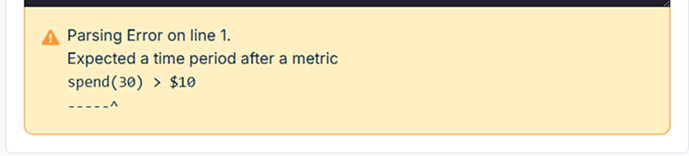
The Composer validates your syntax as you type. Common errors include:
Unexpected value
Indicates a fundamental syntax mistake like mismatched parentheses (), missing commas ,, missing semicolons ; after let, incorrect operator usage, or typos in property/function names.
The validator indicates which value was unexpected, the line it appears, and a preview of the line and placement of the value.
Undeclared variable
Indicates a property name that has not been defined as a variable, or doesn't exist for the selected Dataset Source.
Expected a time period after a metric
Indicates a time-based property that is missing a time period (e.g. 3d.30d) enclosed in quotes, or there is a syntax mistake in the time-period formatting.
Unbalanced parenthesis
Indicates the number of opening and closing parentheses () do not match.
Incompatiable types
Indicates data types being compared are incompatible, for example comparing a property with a number data type to a timestamp type.
Special Values
Even if syntax is valid, calculations can sometimes result in special values:
Division by Zero
Operations like dividing by zero (e.g., sales(7d) / clicks(7d) when clicks(7d) is 0) can lead to invalid results. Currently, if such an operation occurs within your final filter expression for a specific item, that item will likely be excluded from the resulting Segment (the condition effectively evaluates to false). To avoid this, it's best practice to guard against division by zero using and or case....
NaN (Not a Number)
Certain invalid mathematical operations (like 0 / 0) can result in NaN.
Behavior: Any comparison involving NaN (e.g., NaN > 5, NaN = 5, NaN = NaN) always evaluates to false, except for NaN != 5 (or NaN != NaN) which evaluates to true.
Impact: If a calculation results in NaN, conditions using that result will likely evaluate to false unexpectedly. Guarding against the inputs (like division by zero) is the best prevention.
Infinity / -Infinity
Dividing a non-zero number by zero can sometimes result in Infinity or -Infinity.
Behavior: Comparisons involving Infinity generally work as expected mathematically (e.g., Infinity > 100 is true, Infinity < 100 is false, -Infinity < 0 is true).
Impact: Usually less problematic than NaN, but indicates an edge case (like zero clicks but positive sales, which shouldn't typically happen for calculated ratios like RPC). Again, guarding inputs is key.
Debugging Tips
- Use
let: Break complex formulas into smaller steps using let variables. Check the values of these intermediate Custom Properties in the Segment results to isolate where calculations go wrong. - Simplify: Temporarily comment out parts of your formula to find the specific condition causing an error or unexpected results.
- Check Data Types: Ensure you're comparing compatible types.
- Guard Calculations: Explicitly check for denominators being zero before dividing.
By understanding common errors and how special values behave, you can write more robust and reliable Segments.