
How Amazon Advertising Bidding Works: Strategies, Placements and What You Pay
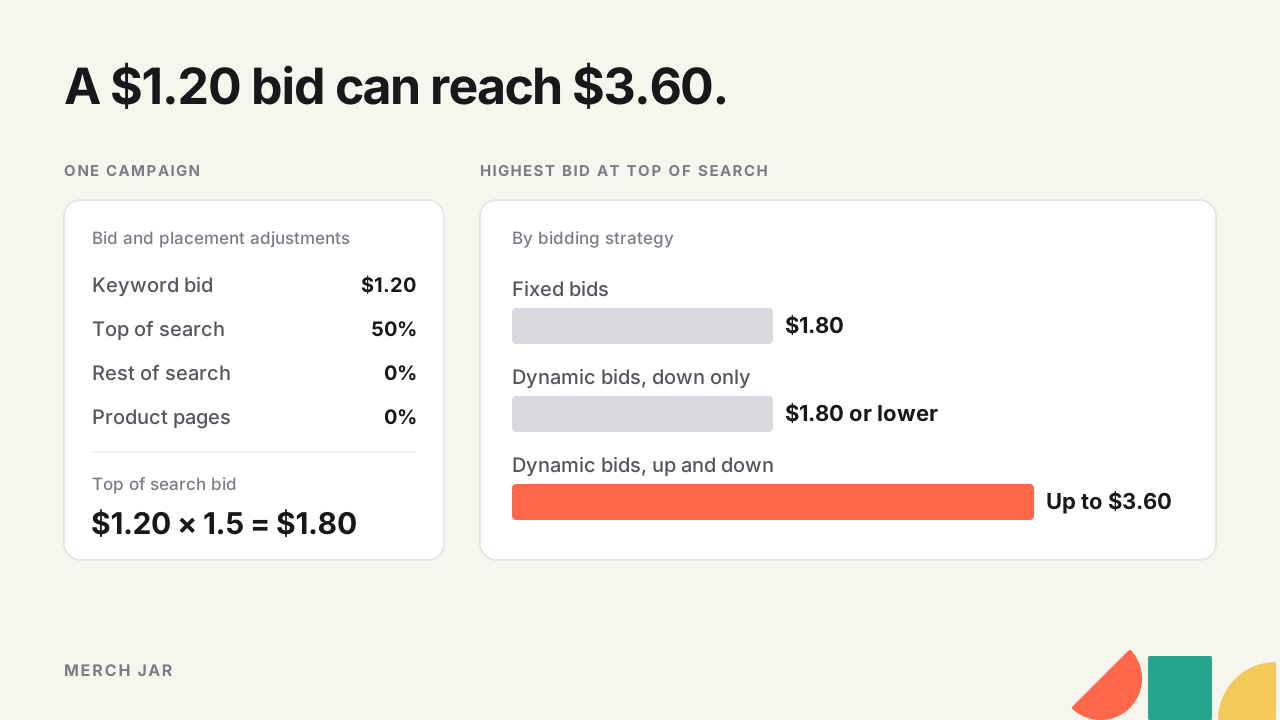
A $1.20 keyword bid can go into a top of search auction at $3.60 without anyone changing it. Amazon advertising bidding is a cost-per-click auction, and the keyword bid is only the starting point. The campaign’s bidding strategy (dynamic bids down only, dynamic bids up and down, or fixed bids) decides whether Amazon can lower or raise that bid in real time. Placement adjustments raise it by a percentage at the top of search, in the rest of search or on product pages. That $3.60 is a 50% top of search adjustment on a campaign running up and down. You pay per click, never more than the adjusted bid.
What the keyword bid itself should be is a separate question, worked out from your margin in our keyword bidding guide. This one is about what happens to that bid afterwards.
How the Amazon ads auction works
Sponsored Products ads are sold in an auction on a cost-per-click basis. You set the most you’re willing to pay for a click, and you’re only charged when a shopper clicks. Amazon’s pricing transparency guide says it mainly weighs the keywords advertisers bid on, how much they bid, and how interested shoppers are likely to be in each offer, which it judges from the offer itself, how similar it is to other offers and past purchases. So the biggest bid isn’t guaranteed the spot. Relevance counts alongside the money.
There’s a gate before any of that. Your product has to be in stock and be the Featured Offer, or the ad doesn’t show at all (Amazon Ads FAQ).
Then there’s what you pay. Amazon’s Sponsored Products best practices calls your adjusted bid the most you’ll pay for a click, and says the final cost per click is based on that adjusted bid plus other factors and never goes above it. The adjusted bid is your keyword bid after the bidding strategy and placement adjustments have done their work, so that’s the ceiling to watch.
The three campaign bidding strategies
The bidding strategy is a campaign setting, so it applies to every keyword and target in the campaign. Amazon’s checklist for new international campaigns defines the three in a line each.
Dynamic bids, down only
Amazon lowers your bid in real time when a click looks less likely to convert, and never raises it. Your keyword bid, plus any placement adjustment, is the ceiling.
Amazon recommends it for your first campaign in a new country and for campaigns that aren’t reaching the return on ad spend you want yet, because it cuts spend on less relevant searches and weaker placements. We’d use it as the default for anything with a thin margin or keywords that haven’t proven themselves.
Dynamic bids, up and down
Amazon raises your bid for clicks it judges more likely to convert and lowers it for clicks less likely to. At the top of search it can raise the bid by up to 100%. On rest of search and product pages it can raise it by up to 50% (Amazon’s FBA advertising guide).
That same guide says up and down fits when sales are the goal, when you want the top of the page for your keywords, and when a campaign is already performing well, carries excess inventory or features deal ASINs. Amazon’s targeting guide recommends it to help maximize performance, and suggests down only if you’re optimizing for ROAS.
Fixed bids
Amazon uses your exact bid and doesn’t adjust it. Placement adjustments still apply on top.
Fixed is the only strategy where the bid you calculate is the bid that goes in every time. That makes it useful when you’re testing a placement adjustment and want one variable, or when your own rules already set each bid from your target and you don’t want a second multiplier on top of them.
How placement adjustments work
A placement adjustment raises your bid by a percentage when your ad is eligible for a particular spot. Amazon’s help page on adjusting bids lists three placements.
- Top of search is the top row of the first page of results, up to the first five positions on desktop and four on mobile.
- Rest of search is the middle and bottom of the results, plus page two and beyond.
- Product pages are ads on product detail pages and on placements outside the search results, such as the add-to-cart page.
Amazon also has a separate adjustment for placements on Amazon Business. Rest of search only got its own adjustment in January 2024 (Amazon’s announcement). Each adjustment runs from 0% to 900%.
Placement bid = keyword bid × (1 + adjustment / 100)
Amazon’s own example is a $1.00 bid with a 50% top of search adjustment, which bids $1.50 when the ad is eligible for top of search. Anywhere without an adjustment it stays at $1.00.
Adjustments only go up. 0% means no increase. It doesn’t take you out of the placement, so you can’t switch product pages off with one, or bid below your keyword bid there. They’re also set per campaign, so a top of search adjustment raises every keyword and target in that campaign together.
Placements aren’t the only adjustment either. Audience adjustments raise a bid for shoppers in audiences you pick, and Amazon’s help page says different adjustment types stack. Its example takes a $1.00 bid to $1.50 with a 50% top of search adjustment, then to $2.40 with a 60% audience adjustment.
How strategy and placement combine
Amazon applies the placement adjustment first, and the bidding strategy then works on the adjusted bid. The help page carries its $1.00 example on. With up and down, Amazon can raise that $1.50 top of search bid as high as $3.00.
Take a constructed example. One campaign, a $1.20 keyword bid, 50% on top of search and 0% on rest of search and product pages. The table shows the highest bid each strategy can put into an auction.
| Strategy | Top of search (50%) | Rest of search and product pages (0%) |
|---|---|---|
| Fixed bids | $1.80, every time | $1.20, every time |
| Dynamic bids, down only | $1.80 or lower | $1.20 or lower |
| Dynamic bids, up and down | Up to $3.60 | Up to $1.80 |
Up and down moves the top of search number more than the adjustment does. On its own the 50% adjustment takes the bid from $1.20 to $1.80. Add up and down and the ceiling is $3.60, three times the keyword bid. Even at 0%, up and down can still put $2.40 into a top of search auction.
On down only, the table is the most you’ll bid. Amazon can only take money off. On fixed, it’s what actually goes in every time, which is why a placement test reads cleanest there.
So when top of search looks expensive, check the campaign’s strategy before you touch the adjustment. On up and down, part of that cost is Amazon’s multiplier, and cutting the adjustment to 0% still leaves the ceiling at double your bid.
Lowering an adjustment from your placement report
Placement results come from the Placement report in Amazon’s Reporting, or from a bulk file downloaded with placement data. For each placement, sales per click times your target ACoS is the most a click there can cost. When a placement’s ACoS runs over target, scaling its bid by your target divided by its ACoS gives you a starting point.
New placement bid = current placement bid × (target ACoS / placement ACoS)
New adjustment = 100 × (new placement bid / keyword bid − 1)
Another constructed example. A campaign bids $1.40 with a 60% top of search adjustment, so it bids $2.24 there. Top of search runs at 40% ACoS against a 30% target. $2.24 × (30 / 40) = $1.68, and 100 × ($1.68 / $1.40 − 1) = 20%. The adjustment goes from 60% to 20%, and the other placements keep their bids.
Treat that as a test. A placement’s numbers reflect who shops there as much as your bid, and cost per click doesn’t always fall in step with the bid. Wait for enough clicks to judge before you cut, and read the next report before you cut again. If the campaign runs up and down, Amazon can still raise that $1.68 at auction time.
When the placement that’s over target is already at 0%, the adjustment can’t go lower. Lower the keyword bids instead, then raise the other placements’ adjustments to hold them where they were. Say product pages run over target in the $1.20 campaign above. Cut the keyword bids by a sixth, to $1.00, and product pages and rest of search both drop to $1.00. To keep top of search at $1.80, its adjustment goes to 100 × ($1.80 / $1.00 − 1) = 80%. To keep rest of search at $1.20, give it 20%.
Bid management across many campaigns
Bid management on Amazon runs on two layers. Keyword bids decide what each target is worth, and the keyword bidding guide works those out from your margin. Campaign settings decide how far Amazon and your adjustments can move them. When something costs more than it should, work out which layer moved before you change either.
A few habits make that easier once there are a lot of campaigns.
- Give each campaign a strategy on purpose and note why. A mix nobody chose is hard to read six months later.
- Change one lever per campaign at a time. Move the strategy and an adjustment in the same week and you’re guessing which one did it.
- If your own rules or a tool set keyword bids from a target, decide whether you want up and down on top. Amazon’s multiplier works on whatever bid your rules picked.
- Leave adjustments at 0% on new campaigns until there’s placement data to argue with. Our campaign structure guide covers the rest of the launch settings.
When the same change has to land on dozens of campaigns, Merch Jar’s API can switch the bidding strategy and set all three placement adjustments on existing campaigns. The weekly routine around all of this is in our guide to Amazon ad management.
Quick answers
What's the best bidding strategy on Amazon?
There isn’t one for every campaign. Down only is the safer default when margins are thin or keywords are unproven. Up and down suits proven campaigns where you want more top of search and can afford a top of search bid that doubles. Fixed fits tests, and campaigns whose bids your own rules already set.
Does Amazon charge my full bid?
Not necessarily. Amazon says the final cost per click is based on your adjusted bid plus other factors and never goes above it, which is why the CPC in your reports can sit below your bids.
Can a placement adjustment lower my bid?
No. Adjustments run from 0% to 900% and only raise a bid. To pay less on one placement, lower the keyword bids and raise the adjustments on the placements you want to keep.
Do placement adjustments work in automatic campaigns?
Yes. When Amazon added the rest of search adjustment, it said the control works with automatic and manual targeting and with fixed and dynamic bids.
Check your own placements
Drop your Placement report, or a bulk file downloaded with placement data, into the free placement report analyzer. It shows what top of search, rest of search and product pages earn per click, campaign by campaign, and which adjustments to lower. The file stays in your browser.